


Trend AI - Happy Chat Anytime
4.6926.00 Reviews
App Specs
- Version
- 1.8.8
- Updated On
- License
- Free
- Downloads
- 500,000+
- Developer
- Sobuj Roy
- Categories
- Entertainment
- Platform
- Android
Screenshots




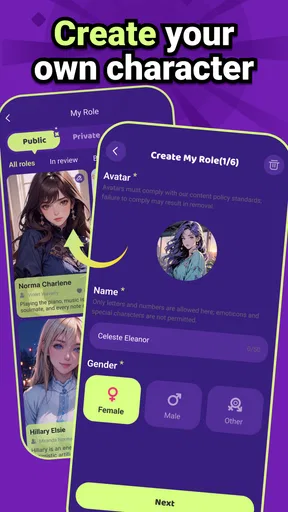
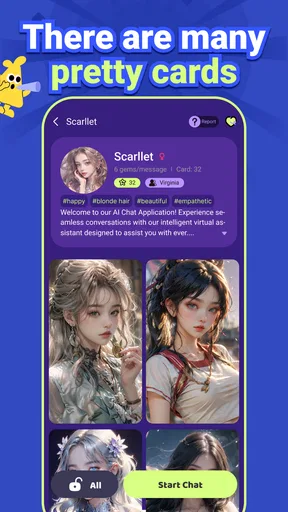
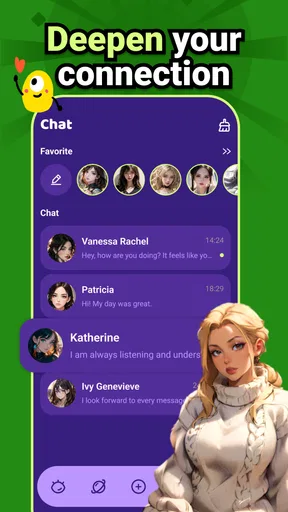
 Analysis by AppCompare
I approached Trend AI - Happy Chat Anytime as an entertainment app rather than a replacement for a search engine, a productivity suite, or a real conversation with someone I know. Its central idea is simple: it uses adaptive AI to make conversations feel more responsive to the mood of the exchange. That focus matters because many chatbots can answer questions, but fewer are designed around the feeling and tone of a casual conversation.
In my experience, the appeal comes from having a low-pressure place to talk, experiment with prompts, or ask for a response that matches a particular emotional direction. You can keep things light, reflective, playful, or more serious depending on how you phrase your messages. The result is not magic, and it is not always perfectly consistent, but it can feel more natural than typing into a rigid question-and-answer tool.
The app is free to download, with optional purchases ranging from $1.99 to $54.99 per item. It is rated for mature users aged 17 and over, so I would not treat it as a general-purpose chat app for children. Sobuj Roy is listed as the developer, and the application has built a sizeable audience, with over 500 thousand installs and a 4.6 average from around 15 thousand ratings. Those figures suggest that the concept is connecting with many users, although popularity alone does not guarantee that its conversational style will suit everyone.
How Trend AI’s mood-aware conversation feels in everyday use
I find the mood-aware idea most useful when I treat a chat as a small, intentional activity rather than an always-on companion. A clear opening cue—such as asking for a lighter tone after a tiring day—gives the exchange a direction and helps me judge whether its style suits me. Next, I’d consider how that experience fits the short, interrupted moments when I actually use a phone.
The capability that defines the experience
The most important thing to understand is that Trend AI is built around mood-aware conversation. That does not mean it can truly read your emotions or understand your personal situation in the way a close friend might. Instead, the practical effect is that the tone of your messages can guide the kind of reply you receive. Wording, context, and the emotional direction you establish all become part of the conversation.
For example, a short message saying that your day was exhausting invites a different kind of response from a request for a joke or a playful idea. The useful part is not simply that the app answers; it is that the exchange can be shaped by the atmosphere you create. I found this more engaging than sending isolated commands, because the conversation feels like something that develops rather than a series of unrelated searches.
That makes the app especially suitable for entertainment and casual company. I can imagine opening it while taking a break, when I want to explore an idea without preparing a formal prompt, or when I am curious to see how an AI reacts to a change in tone. It is less convincing when I expect emotional accuracy, expert advice, or a dependable answer on a sensitive subject.
Worth Reading Before You Choose

EA SPORTS FC Mobile 26 Is a Bigger Football Game, but It Takes Time

Flipboard Shows What News Apps Must Do Beyond the Feed

Switching to Android Auto Means Rethinking Your Driving Routine

Google Calendar Makes a Crowded Week Easier to Manage

Ludo King Makes the Most of the Minutes Between Plans

Baby Panda World Brings Quick Play to Modern Phones, but Its Game Library Feels Busy
What changes when the tone of the chat changes
A normal chatbot often rewards precise instructions. Trend AI is more interesting when I write naturally and let the conversation carry some context. If I begin with a relaxed message, add a personal preference, and then ask for a response in a particular style, the exchange has more personality than a bare request. This is where the adaptive approach has its real effect: it encourages me to interact with the app as a conversational partner instead of a text box.
One useful habit is to state the mood I want rather than assuming the app will infer it correctly. Asking for something calm, humorous, encouraging, or direct gives the conversation a clearer direction. This is not a hidden setting or a complicated technique; it is simply a practical way to get more predictable results from a system whose main strength is adjusting to conversational cues.
I also found that continuity matters. If I switch topics abruptly, the app may follow the new direction, but the emotional thread can become less convincing. Keeping a short exchange focused usually produces a smoother experience than combining unrelated requests in one chat. That trade-off is easy to overlook: the app feels more adaptive when I give it enough context to work with.
A realistic evening use case
Imagine coming home after a tiring day and wanting a few minutes of light entertainment without committing to a film or calling someone. I might start by describing the day in one sentence, ask for a lighter response, and then invite the app to suggest a playful topic. From there, I could ask it to turn an ordinary situation into a funny scenario or continue a small imaginative conversation.
This is where the app makes sense to me. It fills a short gap with interaction, and I can control the pace. I do not have to wait for another person to be available, and I do not need to prepare a polished question. If the exchange becomes dull, I can change direction immediately. The value is modest but real: it offers an easy form of interactive amusement when I want something more engaging than scrolling.
Another practical use is testing different conversational styles before writing a message to someone else. I could ask for a gentler wording, a more upbeat version, or a less awkward way to start a conversation. I would still make the final judgment myself, but the app can provide a starting point. That makes it useful as a rehearsal space, not because it knows the other person, but because it lets me see how different tones might sound.
Where the adaptive approach works best
The strongest results come from open-ended, low-stakes conversations. Brainstorming a silly story, asking for a mood-based recommendation, exploring a fictional situation, or simply keeping a playful exchange going all fit the entertainment purpose. These activities give the system room to adapt without demanding factual perfection.
There is also a small creative benefit in asking the app to transform the same idea into different emotional versions. A plain situation can become cheerful, dramatic, mysterious, or absurd depending on the direction I provide. This is more useful than repeatedly asking for generic content because it tests the capability the app is actually built around: responding to a change in emotional framing.
My advice is to treat each conversation as a guided experiment. Start with a clear tone, give the app one or two pieces of context, and then refine the direction based on its reply. That workflow is more rewarding than expecting the first message to produce a perfect result.
Limitations that become noticeable over time
Mood-aware replies can feel pleasant, but they should not be confused with genuine empathy. The app can respond in a supportive-sounding way without understanding the consequences of what I am describing. For everyday entertainment, that distinction may not matter much. For mental health concerns, emergencies, relationship decisions, or serious personal problems, it matters a great deal.
I would also be cautious about treating confident wording as proof that an answer is correct. An adaptive conversation can feel persuasive because it matches the tone of the moment. That emotional smoothness may make weak advice seem more trustworthy than it deserves. When a topic involves health, money, safety, or legal consequences, I would use a dedicated reliable source or speak with a qualified person instead.
Another trade-off is that the experience depends on how well I communicate what I want. If my message is vague, sarcastic, or emotionally mixed, the response may not land correctly. That is not necessarily a failure of the concept, but it does mean the app is not equally satisfying for every kind of user. Someone seeking instant, exact answers may prefer a conventional search tool or a more task-focused assistant.
Free access and the purchase question
The free entry point makes it easy to try the core idea before deciding whether it belongs in my regular app rotation. That is important here because mood and conversational style are personal preferences. A feature that feels engaging to one person may feel artificial or repetitive to another, so I would spend time with the free experience before considering any optional purchase.
Optional items are priced from $1.99 to $54.99 each, which creates a wide difference between a small purchase and the highest listed price. I would pay close attention to what an item actually adds and whether I use the app often enough to justify it. For a casual entertainment app, recurring or larger spending can become difficult to justify if I only open it occasionally.
My practical rule is simple: use the free version to test whether the adaptive style genuinely improves your conversations. If I find myself returning because the exchanges are consistently enjoyable, a purchase might make sense depending on the specific item. If I am only opening the app out of curiosity, I would keep it free and avoid paying just because the conversation sometimes feels surprisingly human.
Age suitability and responsible use
The mature 17-plus rating should be taken seriously. Even when an app is presented as entertainment, open-ended AI conversation can move into topics or language that are not suitable for younger users. I would not hand it to a child as a casual chat companion, and parents should consider the age classification before allowing access.
For older users, the same principle still applies: the app should be treated as an entertainment tool with limits. Avoid sharing information that could identify you, expose someone else, or create a security risk. A conversational system does not need personal details to help create a funny scenario or continue a fictional exchange, so there is little benefit in revealing sensitive information.
I also think it is healthier to use the app as one activity among others rather than as a substitute for human contact. Its availability makes it convenient, but convenience can encourage long, passive sessions. Setting a purpose for each visit, such as relaxing for a few minutes or exploring a creative prompt, helps keep the experience enjoyable instead of letting it become an automatic habit.
Technical fit and current app details
Trend AI supports devices running Android 7.0 or later, which makes it accessible to many older Android phones as well as newer models. The current version is 1.8.8, so users should check that their device meets the minimum system requirement before trying to install it. I would also keep the app updated through the normal store process, since conversational applications can change in behavior as their versions evolve.
The app’s category is entertainment, and that classification matches my experience. It is not presented as a professional writing environment, a communication service for contacting friends, or a replacement for specialist software. That framing helps set the right expectation: the goal is an engaging exchange, not a guaranteed answer or a structured workflow.
Who will get the most from it
I think Trend AI is best for adults and older teens who enjoy experimenting with conversational AI and want a more emotionally directed exchange than a standard utility chatbot provides. It suits people who like improvisation, casual role-play, creative prompts, and short bursts of digital company. It is also a reasonable choice for anyone who wants to compare how different tones change an AI response.
It is less suitable for someone who needs dependable research, professional guidance, or a highly organized assistant. If my priority is checking sources, managing tasks, or getting concise factual results, I would choose a tool designed specifically for that purpose. Likewise, if I want meaningful emotional support from a person who knows my history, no AI entertainment app can replace that relationship.
The app’s strongest audience is therefore quite specific: people who value the experience of the conversation itself. If the process of shaping a mood and seeing the reply evolve sounds enjoyable, the application has something distinctive to offer. If I only care about speed and accuracy, its adaptive personality may feel like unnecessary decoration.
My recommendation after using the app
Trend AI is most convincing when I use it as a mood-shaped entertainment space, not as an authority. Its adaptive conversation idea gives ordinary prompts more character, and the best exchanges come from giving the app a clear emotional direction while leaving room for improvisation. That makes it more engaging than a basic question-and-answer interaction in the right setting.
At the same time, the experience depends heavily on expectations. The app cannot guarantee emotional understanding, and a warm or confident response should not be treated as expert advice. The mature age rating, optional purchases, and need for thoughtful prompting are all reasons to use it deliberately rather than automatically.
I would recommend trying the free version if you want casual AI conversation, creative mood changes, or a private place to rehearse ideas. I would skip it if you are looking for a research tool, a professional assistant, or a replacement for human support. For the right user, Sobuj Roy’s app offers an accessible and occasionally entertaining way to turn a simple chat into a more responsive experience.
Pros
- Available for casual conversations whenever you need them.
- AI personas can make chats feel more varied and entertaining.
- Simple interface makes starting a conversation quick.
- Useful for brainstorming
- role-play
- and creative prompts.
- Chat experience is convenient on both supported mobile platforms.
Cons
- AI responses may sometimes feel repetitive or lack emotional depth.
- Some features or characters may require in-app purchases.
- Privacy terms should be reviewed before sharing personal information.
- Responses can occasionally be inaccurate or misunderstand context.
- Requires an internet connection for most conversations.
FAQs for Trend AI - Happy Chat Anytime
What is Trend AI - Happy Chat Anytime?
Trend AI - Happy Chat Anytime is an AI-powered chat application designed for casual conversations, questions, brainstorming, and everyday assistance. After exploring its main functions, the app feels aimed at users who want quick responses in a simple chat interface rather than a complex productivity platform. It can be useful for generating ideas, explaining topics, drafting text, or simply having an entertaining conversation whenever you need it.
Can Trend AI - Happy Chat Anytime answer questions and help with everyday tasks?
Yes, the app can generally assist with common requests such as explaining concepts, rewriting messages, suggesting ideas, creating short pieces of content, and answering general questions. However, its responses should be treated as helpful suggestions rather than guaranteed facts. For medical, legal, financial, academic, or other important decisions, users should verify the information with reliable sources and qualified professionals before taking action.
Does Trend AI - Happy Chat Anytime require an internet connection?
An internet connection is normally required because AI conversations are processed through online services. This means the quality and speed of replies may depend on your Wi-Fi or mobile data connection. During testing, users should also expect occasional delays, service interruptions, or limits imposed by the app’s servers. It is therefore not the best choice if you need a fully offline chatbot while traveling or in areas with poor coverage.
Is Trend AI - Happy Chat Anytime free to download and use?
The application may be available to download without an upfront charge, but free access can include limitations such as advertisements, restricted messages, fewer features, or usage caps. Some functions may require an in-app purchase or subscription. Before confirming any payment, carefully review the pricing page, renewal terms, trial period, and cancellation instructions shown in the relevant app store, since offers can vary by device, region, and time.
Is it safe to share personal information in Trend AI - Happy Chat Anytime?
Users should avoid entering sensitive information such as passwords, payment details, identity documents, private medical records, or confidential work material into any AI chat service. Conversations may be processed or stored according to the developer’s privacy policy, and AI systems are not a substitute for secure personal storage. Before using the app regularly, review its permissions, privacy practices, data-retention details, and account-deletion options.


